请注意,本文编写于 186 天前,最后修改于 181 天前,其中某些信息可能已经过时。
目录
环境准备
需要 jeprof 工具解析 heap 文件 apt install libjemalloc-dev graphviz
代码
cargo.toml
toml[package]
name = "test260202"
version = "0.1.0"
edition = "2024"

[dependencies]
tikv-jemallocator = { version = "0.6", features = ["profiling"] }
tikv-jemalloc-ctl = { version = "0.6", features = ["profiling", "use_std"] }
main.rs
rust#[global_allocator]
static GLOBAL: tikv_jemallocator::Jemalloc = tikv_jemallocator::Jemalloc;

#[unsafe(export_name = "_rjem_malloc_conf")]
// lg_prof_sample:0 表示每次分配都采样(最详细,但性能开销大)
// lg_prof_sample:10 表示每 1KB 采样一次(推荐)
// lg_prof_sample:19 表示每 512KB 采样一次(默认值)
pub static MALLOC_CONF: &[u8] = b"prof:true,prof_active:true,lg_prof_sample:10\0";

use std::{
    ffi::CString,
    fs,
    process::Command,
    time::{Duration, SystemTime, UNIX_EPOCH},
};

use tikv_jemalloc_ctl::raw;
fn main() {
    let mut keep = Vec::new();
    for _ in 0..1024 {
        keep.push(vec![0u8; 4096]);
    }
    std::thread::sleep(Duration::from_millis(200));

    let path = heap_profile_pdf_impl();
    println!("Heap profile PDF saved to {}", path.display());
    std::mem::forget(keep);
}

fn heap_profile_pdf_impl() -> std::path::PathBuf {
    let pid = std::process::id();
    let ts = SystemTime::now()
        .duration_since(UNIX_EPOCH)
        .expect("SystemTime error")
        .as_secs();

    // 生成 heap dump 文件
    let heap_filename = format!("heap.{}.{}.heap", pid, ts);
    let mut heap_path = std::env::temp_dir();
    heap_path.push(&heap_filename);
    let heap_path_str = heap_path.to_string_lossy().into_owned();
    let c_path =
        CString::new(heap_path_str.clone()).expect("Failed to create C string for heap path");

    // 导出 heap dump
    println!("Generating heap dump: {}", heap_path_str);
    let ptr = c_path.as_ptr();
    unsafe {
        raw::write(b"prof.dump\0", ptr).expect("jemalloc heap dump failed");
    }

    // 生成 PDF 文件
    let pdf_filename = format!("heap.{}.{}.pdf", pid, ts);
    let mut pdf_path = std::env::current_dir().expect("Failed to get current dir");
    pdf_path.push(&pdf_filename);
    let pdf_path_str = pdf_path.to_string_lossy().into_owned();

    // 获取当前二进制文件路径
    let binary_path = std::env::current_exe().expect("Failed to get binary path");
    let binary_path_str = binary_path.to_string_lossy();

    println!(
        "Running jeprof: binary={}, heap={}, output={}",
        binary_path_str, heap_path_str, pdf_path_str
    );

    // 执行 jeprof 命令
    let output = Command::new("jeprof")
        .arg("--pdf")
        .arg(binary_path_str.as_ref())
        .arg(&heap_path_str)
        .output()
        .expect("Failed to execute jeprof (make sure jeprof is installed)");

    if !output.status.success() {
        let stderr = String::from_utf8_lossy(&output.stderr);
        let _ = fs::remove_file(&heap_path);
        panic!("jeprof execution failed: {}", stderr);
    }

    // 读取生成的 PDF
    let pdf_bytes = output.stdout;
    if pdf_bytes.is_empty() {
        let _ = fs::remove_file(&heap_path);
        panic!("jeprof generated empty PDF");
    }

    fs::write(&pdf_path, &pdf_bytes).expect("Failed to write PDF");

    // 清理临时文件
    let _ = fs::remove_file(&heap_path);

    println!(
        "Successfully generated heap profile PDF: {} bytes",
        pdf_bytes.len()
    );

    pdf_path
}
使用
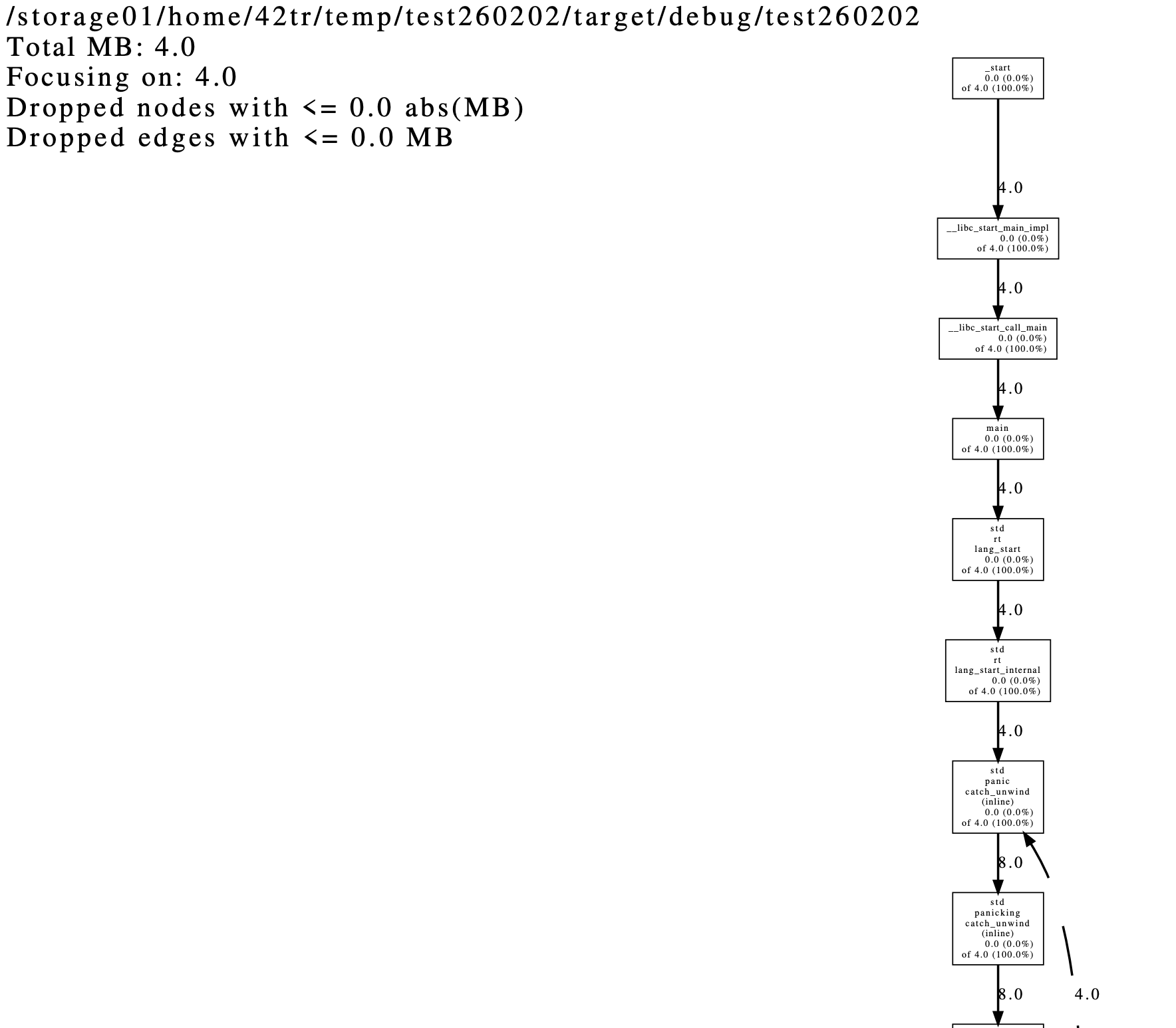
cargo run 在当前目录生成文件 heap.3742391.1770170243.pdf,可以加到 debug 中实时生成 heap 文件,pdf 文件可后续有问题时再解析,也可以使用其他方式处理 heap 文件。
如果对你有用的话,可以打赏哦
打赏


本文作者:42tr
本文链接:
版权声明:本博客所有文章除特别声明外,均采用 BY-NC-SA 许可协议。转载请注明出处!
目录